HomepageLife360 logo
Pet SafetyMembership PlansShopSale
Get started
Core Tile 1

Tile

Small size, big features

Core Tile Pro 1

Tile Pro

Longest range

Core Tile Slim 1

Tile Slim

Fits anywhere

Core Tile Sticker 1

Tile Sticker

Sticky to stay put

pet gps feature

GPS Pet Tracker

Real-time pet tracker

ImageAsset

Sale

Shop Limited Time Deals!

  • New Arrivals
  • Custom Branded Tiles
Explore Tile Trackers
da762308-f79a-471f-b73b-479cce75a91b 1

Location Sharing

See they’re safe — no calls or check-ins needed.

nav-driving-safety

Driving Safety

Wherever they’re headed, we’ll be along for the ride.

260x174-Digital-safety 1

Digital Safety

From unexpected digital threats to the unwanted charge — we've got you.

260x174-Aging-Parents-Final

Parents

They stay independent. You stay informed.

nav-emergency-assistance

Emergency Assistance

Count on us when every second counts.

All Articles

Using my smart watch to keep tabs on family.

Published: 4 Apr 2014

| Updated: 30 Jan 2024

• Life360
image-fallback
galaxy-gear-life360

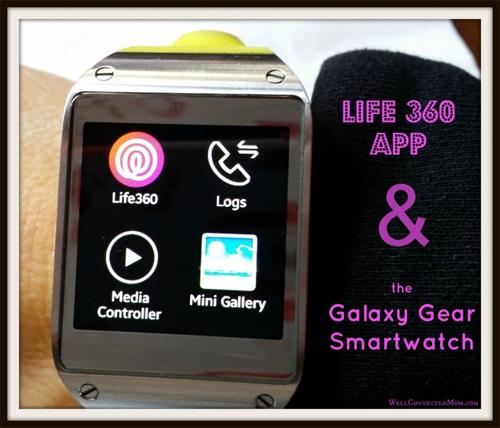
Having not worn a watch for many years, wearing the Samsung Galaxy Gear smartwatch took some getting used to. But now it’s indispensable. Yes, I can check the time, be alerted of incoming texts, take and make phone calls on it, and even take pictures and video on it.

But recently, one app has become available on the Galaxy Gear that has proved to be an incredible convenience. I downloaded the Life360 app onto my smartphone and absolutely love it.
husband-life360

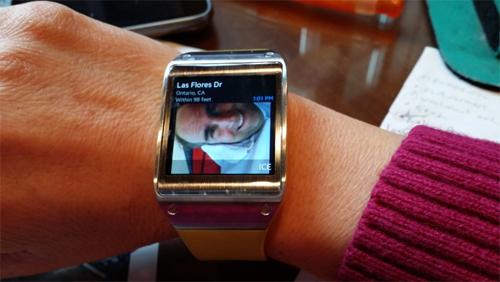
Is he OK?

Life360 has been a great app to keep tabs on my family. My husband is a Deacon at our church and once a month they have a meeting at church that can run late…really late. With Life360, I can check on my phone to know where he is. But now with the Life360 app on my Galaxy Gear smartwatch, I don’t have to get up to go to my phone. I can just check my watch. Love it!
quick-notes-life360

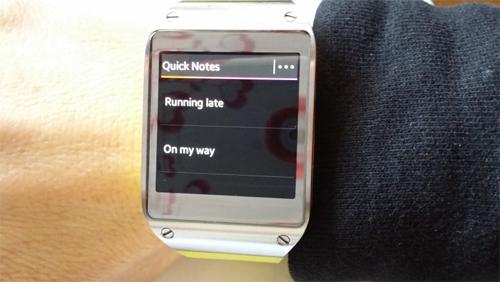
Quick Notes

The Quick Notes feature is so handy. I have experienced a number of times where I would love to send my husband a status quick note before I began driving, but I don’t want to take the time. Now, I can just pull up Quick Notes and select “On my Way” or Running late” to alert him of my status. Love it!
check-in-panic-life360

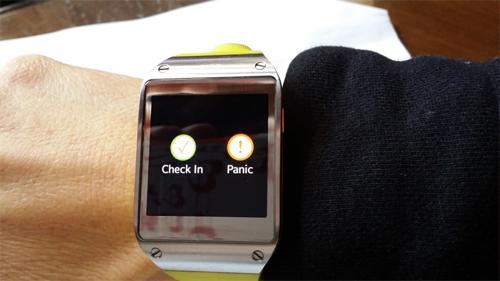
Check-in/Panic

Life 360 updates my family members every so often, but sometimes it helps to give it some extra help. I like that I can check-in on my Galaxy Gear so that when I travel, my husband will know that I arrived to my destination safely. No need to text. I can also click the Panic button to alert my husband of any scary situation I may be in.
live-advisor-life360

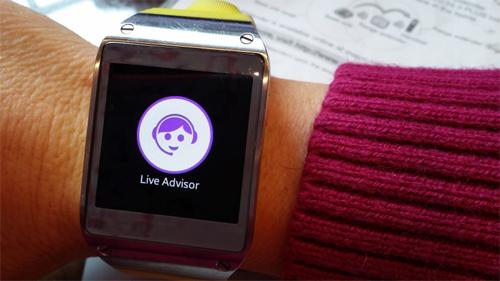
Live Advisor

Now this is cool. With the Premium version of Life360, you have immediate access to a live person…right on your wrist. Calling the Live Advisor can get me help with medical emergencies, auto accidents, help with a tow truck, missing family members, and more.

If I’m in a crisis situation, the last thing I will think of is to grab my phone and open up my Life360 app. But with the app on my wrist, I can get help immediately. And better yet, the Live Advisor will have my exact GPS tracking info. and can provide my location to emergency personnel, tow trucks, etc.

The free Galaxy Gear app shows me that Life360 is committed to innovative ways to help you keep track of your family in convenient ways to make your life a little smoother. You can find the Life360 Galaxy Gear app here.

Related Articles
New Earth Tone Colors Are HereIntroducing Temporary Location SharingMeet Life360 Pet GPS — Made for the Whole FamilyIntroducing No Show Alerts: Know When They Don’t Arrive, Right on TimeChris Hulls on the CEO Transition
  1. Home>
  2. Blog>
  3. Life360>
  4. Using my smart watch to keep tabs on family.
Sign up to get 15% off your first order of Life360 Bluetooth trackers.

By entering my email and clicking Sign up I agree to receive Life360 emails with exclusive updates, offers, and personalized messages (e.g. cart reminders). I have read and agree to the Life360 Terms of Service and acknowledge the Privacy Policy.

App Store ButtonGoogle Play

Company

AboutOur TeamCareersPartner with UsCustom Branded TilesPressInvestor RelationsTrust & SafetySustainabilityEnterprise Tracking Partnership

Support

Help CenterActivate a Tile TrackerBlogMember ProtectionOrder StatusShippingWarranty & Refund PolicyReport a Security Vulnerability

Legal

Law Enforcement GuidelinesReseller PolicyTerms of ServicePrivacy PolicyDeclaration of ConformityUser GuidesPrivacy Options icon

©2026 Life360, Inc.
TILE and the TILE design are trademarks of Tile, Inc., a subsidiary of Life360, Inc.

  • Twitter Opens in a new tab
  • YouTube Opens in a new tab
  • Facebook Opens in a new tab
  • Instagram Opens in a new tab
  • LinkedIn Opens in a new tab