HomepageLife360 logo
Pet SafetyMembership PlansShopSale
Get started
Core Tile 1

Tile

Small size, big features

Core Tile Pro 1

Tile Pro

Longest range

Core Tile Slim 1

Tile Slim

Fits anywhere

Core Tile Sticker 1

Tile Sticker

Sticky to stay put

pet gps feature

GPS Pet Tracker

Real-time pet tracker

ImageAsset

Sale

Shop Limited Time Deals!

  • New Arrivals
  • Custom Branded Tiles
Explore Tile Trackers
da762308-f79a-471f-b73b-479cce75a91b 1

Location Sharing

See they’re safe — no calls or check-ins needed.

nav-driving-safety

Driving Safety

Wherever they’re headed, we’ll be along for the ride.

260x174-Digital-safety 1

Digital Safety

From unexpected digital threats to the unwanted charge — we've got you.

260x174-Aging-Parents-Final

Parents

They stay independent. You stay informed.

nav-emergency-assistance

Emergency Assistance

Count on us when every second counts.

All Articles

Windows Phone Family Locates Life360!

Published: 5 Jun 2014

| Updated: 30 Jan 2024

• Life360
image-fallback
life360-windows-phone-screen1

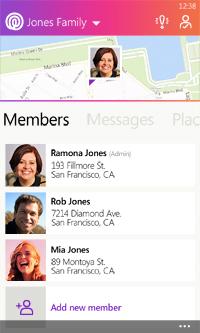
That’s right, it is finally here! The Life360 Family Locator app is now available in the Windows Phone store for WP8 and above. That means now everyone in your family can stay connected on Life360 regardless of the device! iPhones, Androids, Windows Phones, and even non-smartphones.

Most of us have families that have all kinds of devices and different operating systems. The addition of Life360 for Windows Phone fills that gap for this growing segment of users. This also means that if you decide to change phones and switch to a different type you will still be able to continue using Life360 without any interruptions. Just download the app to your latest device and log in to be connected to your existing account.

If you are new to Life360 you will be amazed at what it can do. You create a Circle (group) of your family and friends in the app. Then Life360 uses GPS technology to locate all of the group members and it neatly shows you each member on a map with their own icons. Alerts can be set up so you receive a notice when someone in your circle arrives or leaves a location, like home, school or work.  This is perfect for keeping that peace of mind that your kids arrived to school safely and made it back home the same way!  Life360 also keeps families connected– especially when schedules change or you’re traveling. Messaging within Life360 allows you to quickly let everyone know things like where to meet for dinner or that it is time for the family to meet back up at a certain spot in the mall to head home.

While you can do some of these tasks on your smartphone already, Life360 brings everything together in one place, and now on everyone’s platform, making it easier to locate and connect with the people in your inner circle in a private setting.

So for all of you Windows Phone fans out there (myself included) head over to the Windows Phone store and get the new Life360 Family Locator app now and give it a try. You will love the simplicity of the app, and how it keeps your family connected and provides the extra piece of mind.

Related Articles
New Earth Tone Colors Are HereIntroducing Temporary Location SharingMeet Life360 Pet GPS — Made for the Whole FamilyIntroducing No Show Alerts: Know When They Don’t Arrive, Right on TimeChris Hulls on the CEO Transition
  1. Home>
  2. Blog>
  3. Life360>
  4. Windows Phone Family Locates Life360!
Sign up to get 15% off your first order of Life360 Bluetooth trackers.

By entering my email and clicking Sign up I agree to receive Life360 emails with exclusive updates, offers, and personalized messages (e.g. cart reminders). I have read and agree to the Life360 Terms of Service and acknowledge the Privacy Policy.

App Store ButtonGoogle Play

Company

AboutOur TeamCareersPartner with UsCustom Branded TilesPressInvestor RelationsTrust & SafetySustainabilityEnterprise Tracking Partnership

Support

Help CenterActivate a Tile TrackerBlogMember ProtectionOrder StatusShippingWarranty & Refund PolicyReport a Security Vulnerability

Legal

Law Enforcement GuidelinesReseller PolicyTerms of ServicePrivacy PolicyDeclaration of ConformityUser GuidesPrivacy Options icon

©2026 Life360, Inc.
TILE and the TILE design are trademarks of Tile, Inc., a subsidiary of Life360, Inc.

  • Twitter Opens in a new tab
  • YouTube Opens in a new tab
  • Facebook Opens in a new tab
  • Instagram Opens in a new tab
  • LinkedIn Opens in a new tab