Top Ten Back to School Safety Tips For Parents, Students and Drivers
![[Blog] Image placeholder](https://images.ctfassets.net/nywvtjnh7p05/7gT5B1WUEVlA4WBUy3pwHR/45f02e60e8b0281a437a82edb165a45e/image-fallback.jpg?w=1920&fm=webp)
![[Blog] WP Image 29689](/_next/image?url=https%3A%2F%2Fimages.ctfassets.net%2Fnywvtjnh7p05%2Fwp_media_29689%2F3605e9069634529a1e239fc68f39635a%2Fshutterstock_485661592.jpg&w=1920&q=75)
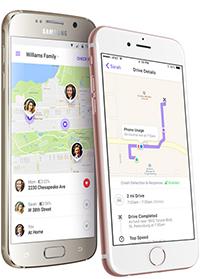
It’s almost that time of year, when kids go back to school, new teen drivers hit the streets and college students start packing for their new dorms. As parents, we’re equally relieved, excited and anxious that our kids are starting the new school year! In fact, we find that it’s one of the most active times of the year for families using Life360. Families add “Places” such as school as much as 50% more. From family location features to drive monitoring, many families use Life360 to make life a little easier, with the peace of mind knowing that their children are safe during the school year.
This time of year introduces new challenges and safety concerns, but with a little bit of education, you and your family can be better prepared. Whether it’s walking, driving, or taking a bus, we’ve compiled a list of the top 10 safety tips for traveling to school for a safer experience.
For Families
Get Life360 in Your Life: Life360 offers a great way to make sure that you know your kids get to school and arrive home safely! Watch them in real time when they’re traveling and follow their route, or get automatic notifications pushed to your phone for daily peace of mind. With Driver Protect, you can get a report on your teen driver’s speed, braking, and instances of cell phone use while driving. For further safety measures, Driver Protect offers roadside assistance and crash detection in case of emergencies.
“My kids enjoy more freedom and they appreciate the fact that I’m not constantly bugging them about their whereabouts. I can tell where they are and see when they are on their way home. They can take their time driving even after curfew because I can see them making progress on their route (so I’m more understanding). I can also discreetly check that they made the drive safely to school each morning even though our local roads are often snow-covered and slippery and riddled with deer.” – Wendy L.
Know Where to Be Picked Up: If you plan on picking up your child, make sure to set a regular place for pickup that is both easily accessible for a car and is a safe place for your kids to wait, in case you are late. Highly trafficked areas are not ideal (or safe).
Have a Pre-established Route: If walking to school, have a pre-established daily route that you both agree upon. They should not deviate from that route or take any shortcuts which can be unfamiliar to them and not vetted by you. Doing so should help mitigate any dangers or risks.
Walk with Friends! If at all possible, walking with a friend or a group is always safer than walking by yourself.
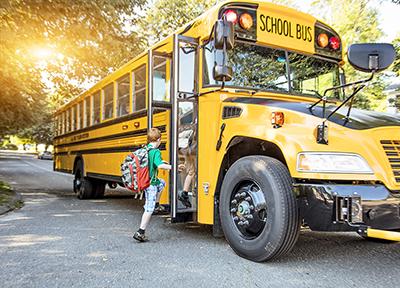
Don’t Rush to the Bus: If your child is taking the bus, make sure they arrive early so they don’t feel tempted to rush or cut any corners—like running across the street—while trying to catch it.
Obey the Proper Crossing Rules: Make sure your child obeys the rules of the road: it’s important to use the marked crosswalks at traffic signals, wait for the pedestrian walking signs, always be mindful of your surroundings and watch for oncoming cars. Do not use phones, play games or listen to headphones too loudly as they can be major distractions while in highly trafficked areas—especially when crossing the street.
“This app made parent-teen relationships so much better at our house! The kids don’t have to remember to text me. I hear the notifications when they leave school, practice, etc. I don’t even have to stop what I am doing, I just hear it and know they are on schedule. Even if they make mistakes like staying out too late, I can see for myself that they are safe (just late)… no freak-out late-night arguments. I haven’t obsessed about following my family’s every move because using the driving history a couple times showed me they really are doing well on the road. To me this app is a good example of life-improving use of technology!” – Laura R.
For Teen Drivers
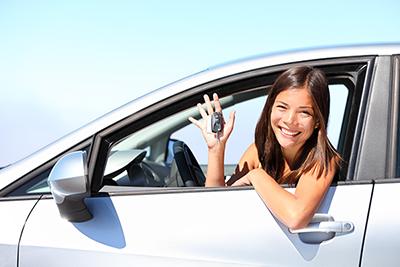
Make sure your teen doesn’t distract themselves with their phone while driving. Texting while driving and taking your eyes off the road could result in a serious accident. Don’t change the music on your phone, don’t take a call, don’t text, it can be dangerous—and illegal. With Safe Drive Reviews in Driver Protect, we let you know what occurred during each drive with instant, detailed reviews. Information about the drive including alerts for Phone Usage, Rapid Acceleration, Hard Braking, and the Top Speed are shown on the map at the time of occurrence. As much as 58% of Driver Protect users have reported reduced phone usage while driving!
Don’t Have a Party in Your Car: Blasting the latest Taylor Swift song can be fun, but a car full of screaming, bouncing teens is no joke. Make sure everyone is in their seat, buckled up, with the music at a reasonable volume. Leave the karaoke to sleepovers!
Drive to School Early: Driving while late to class is an easy excuse for speeding. Don’t rush. Accidents increase and defensive driving goes out the window when teen drivers speed to get to class on time. You can help your teens be better drivers by turning on Drive Detection in Life360. Doing so will enable both of you to see the top speed reached during each drive, which can help to reduce and dissuade bad habits.
Slow Down for School Zones: Speed limits are reduced in school zones for a reason. With so many children crossing the street, it’s recommended that you do not pass vehicles, especially school buses. It’s better to be safe and slow than sorry (as well as avoiding any chance of getting a ticket)!
“Great for families! For a family with multiple kids and multiple adults responsible for dropping off and/or picking up the kids from school, this app makes it easy for making sure everyone is in-the-know of where people are in relation to getting the kids. We have set up zones at the school, the bus stop and various homes for the adults. We now know for sure when people are making the pick up or drop off on time. This also makes it easy for family functions, as we can call people and give them directions based on where they are.” – Tremaine K.
Is your family beginning the school year soon? Add “school” as a place today and get notified when your kids arrive and leave! Want to hear more tips, stories and articles from Life360? Join our community on our Facebook page Have a great school year and stay safe! – Life360